
Club Car Wash Mobile App
Club Car Wash Operating, LLCAuto & Vehicles
4.8518.00 Reviews
- Version
- 20.4.0
- Installs
- 100.00K
- Age Rating
- Everyone
Screenshots
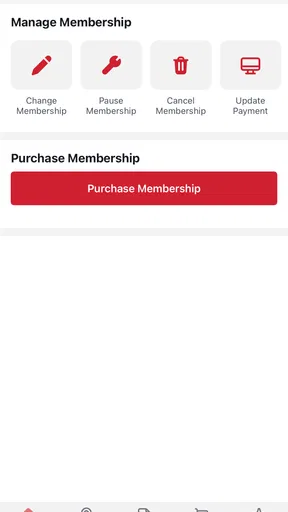
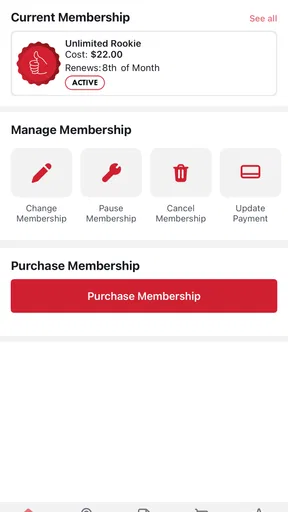
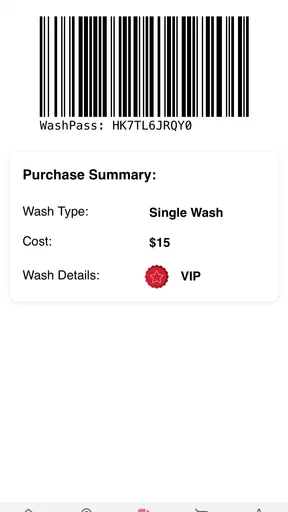
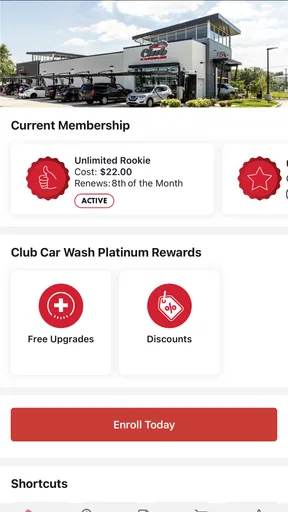
Our Review of Club Car Wash Mobile App
 Analysis by Appyee
I approached Club Car Wash Mobile App as a practical tool rather than something I would open for entertainment. Its job is to make car-wash membership management easier, and that narrow purpose is important: the app is most useful when it removes small chores from a routine you already have. Instead of treating it like a complete vehicle-care platform, I see it as a mobile doorway into the Club Car Wash membership experience.
That focus makes the app potentially valuable for people who visit Club Car Wash regularly and want a simpler way to stay connected to their membership. It is less compelling for someone who washes a car only occasionally, uses several unrelated wash providers, or expects detailed vehicle maintenance tools. My overall impression is positive, but the real question is not whether the app is polished in the abstract. It is whether its membership-centered approach fits the way you actually wash and manage your vehicle.
How the app feels to use in everyday situations
I find the app’s everyday value comes from having membership management close at hand, rather than from adding another step to the wash itself. Before relying on it during a visit, I’d get comfortable with the account screens at home and decide which details I may need on the go. That small bit of preparation makes it easier to judge whether this focused tool fits my routine.
Readability and navigation matter more than decoration
When I review an app built around a repeated errand, I pay attention to how quickly I can understand the next step. A car-wash app is often used in a hurry: I may be sitting in a vehicle, preparing to drive, or trying to check membership information between other tasks. That means clear labels, sensible grouping, and a calm layout are more valuable here than visual flourishes.
The central idea behind this application is straightforward. Club Car Wash Operating, LLC presents it as a way to manage a wash membership from a phone. In practice, that means I would expect the useful parts of the experience to be the areas that help me review or handle membership-related tasks without needing to rely on a paper receipt, a separate note, or a conversation at the wash location.
For a new user, I would recommend opening the app at home before the first drive-through visit. That gives you time to read each screen, understand where your account information is organized, and resolve any sign-in or account setup friction while you are not blocking a queue. This is a small habit, but it makes a noticeable difference with any app used in a time-sensitive setting.
The interface also has an important readability context: many people will use it outdoors, in a parked car, or while dealing with glare. Even a well-organized screen can become harder to read when sunlight reflects off a phone. I would increase the device text size if needed and avoid trying to complete account work while moving through a wash lane. The app can support the errand, but it should not compete with safe driving or attention to staff instructions.
One useful way to think about navigation is in two stages. First, use the app away from the wash to prepare: check the membership area and make sure your account details are familiar. Second, use it briefly during the actual visit only when necessary. This reduces the pressure to interpret unfamiliar controls at the exact moment when you need to move your vehicle.
Motor and sensory considerations
Membership management can be easier than handling loose cards, printed documents, or a conversation while balancing keys and a phone. For users who find repeated physical handling tiring, a centralized mobile account may reduce some effort. The benefit is not that the app removes every physical step at the car wash, but that it can move part of the administrative work into a device many people already carry.
At the same time, a phone is not automatically easy for every user. Small touch targets, repeated scrolling, glare, vibration, or the need to hold a device steadily can create friction. I would not assume that a membership app is equally comfortable for someone with limited hand movement, tremors, low vision, hearing loss, or sensory sensitivity. The practical experience depends on the phone, operating-system settings, lighting, and the user’s preferred way of interacting.
For someone with motor limitations, the best workflow is to complete as much as possible before arriving. If another person helps with account management, preparing the app together at home may be more comfortable than trying to coordinate beside a moving line of vehicles. A trusted helper can also make sure the correct membership information is being viewed without forcing the driver to operate the phone while concentrating on the lane.
For users with visual needs, device-level text enlargement, display contrast adjustments, and screen-reading tools may help where the app follows the operating system’s conventions. I would test the important screens in advance rather than assume every label or control will behave perfectly with assistive technology. That test is especially worthwhile before depending on the app for a time-sensitive membership question.
Users who prefer less sensory stimulation may appreciate the app’s narrow purpose compared with a crowded social or shopping application. Still, the physical wash environment is a separate issue. Bright daylight, vehicle movement, water noise, staff directions, and waiting vehicles can be more demanding than the screen itself. The app may simplify the account side of the visit without changing the sensory character of the location.
Situational access: where the app helps and where it does not
The strongest use case I can see is a regular customer who wants membership tasks available in the same place as the rest of the phone routine. Imagine leaving work on a rainy afternoon and noticing that the car needs attention. Instead of searching through a wallet or trying to remember account details, you can prepare the membership-related part of the visit before reaching the wash. The value is modest but real: fewer loose steps during an already busy trip.
Another useful situation is household coordination. If more than one person uses the vehicle or helps manage its expenses, a mobile account can make the membership easier to keep track of than an isolated physical item. I would still be careful about sharing login details casually. A better approach is to decide who should manage the account and avoid handing a phone to someone while the vehicle is moving or waiting in an active lane.
The app may also suit people who prefer handling routine administration independently. A person who dislikes asking staff to repeat membership information, or who finds face-to-face account questions stressful, may value having a digital starting point. That does not guarantee that every issue can be solved inside the app, but it can make the first step less socially demanding.
For drivers with limited time, the app is best treated as a preparation tool rather than a reason to use the phone at the last second. I would review the account before leaving, keep the phone accessible without holding it while driving, and follow the wash location’s instructions over anything displayed on the screen. Convenience should reduce distraction, not create another one.
People who travel between regions should also think about how dependent they are on one local wash network. The app is built around Club Car Wash rather than around comparing unrelated providers. If your routine changes frequently, a general payment wallet, a browser bookmark, or direct contact with each provider may be more flexible. The dedicated app makes more sense when Club Car Wash is already part of your regular pattern.
What the rating and platform details tell me
The application is free, carries an Everyone content rating, and has reached over 100,000 installs. It holds a 4.5 average from around 700 ratings, with more than 400 written reviews. Those figures suggest that the app has found a meaningful audience and that many users consider the basic experience worthwhile, but they should not replace your own judgment about accessibility or membership fit.
It was released on September 10, 2025, and the current version is 20.4.0. The minimum operating-system requirement is version 12, so compatibility is worth checking before planning your workflow around it. A supported phone is only the starting point: available storage, screen settings, account access, and the reliability of your connection can all affect how comfortable the experience feels.
I also like that the age rating does not create an obvious barrier for ordinary households. However, an Everyone rating describes content suitability, not ease of use for every ability. A safe age classification cannot tell me whether a user with low vision can comfortably read every screen or whether a person with limited dexterity can complete each interaction without assistance.
Remaining barriers and realistic trade-offs
The biggest limitation is the app’s narrow scope. It is not a general car-maintenance planner, a vehicle-diagnostics tool, or a universal wash finder. If you want tire reminders, service records, fuel tracking, or comparisons between different car-care businesses, this application is unlikely to replace those tools. Its value depends on being a Club Car Wash customer first.
There is also a difference between managing a membership and solving a membership problem. An app can make information easier to reach, but unusual account situations may still require help from the company or a wash location. I would not wait until the busiest possible visit to discover that an issue needs personal assistance. Checking the account in advance gives you time to choose a less stressful route.
Another trade-off is dependence on the phone itself. A dead battery, a damaged screen, forgotten credentials, or poor connectivity can make a digital process less convenient than a physical alternative. I do not see that as a reason to reject the app, but I would avoid treating it as the only possible way to handle every visit. Keeping basic account awareness and knowing where to seek assistance is sensible.
Privacy and shared-device habits deserve attention too. Because membership management can involve personal account information, I would use a screen lock, avoid leaving the account open on a communal phone, and sign out or switch users when appropriate. These are general phone-safety steps, but they matter more when an application is tied to a paid service relationship.
For users who need highly predictable accessibility, I would take a trial-first approach. Install it on the device you actually use, enlarge text if necessary, test the key membership screens, and confirm that the controls are comfortable before relying on it during a busy visit. If the app does not cooperate with your preferred assistive setup, direct support or another account-management route may be the better choice.
Who should use it, and who should skip it
I would recommend the app to regular Club Car Wash members who want membership management close at hand. It is also a reasonable choice for households that prefer digital organization, users who want to prepare before arriving, and people who find it easier to review account information privately on a phone than at a counter or lane.
I would be more cautious if you wash your car only rarely. In that case, installing a dedicated app may add another account and another icon without saving much effort. Someone who uses multiple car-wash companies may also prefer a broader payment or browser-based routine, because a single-provider app will not organize the rest of that activity for you.
Users with accessibility needs should not be persuaded by the free price alone. Free removes a financial entry barrier, but it does not guarantee that the interface, physical wash environment, or support process will suit every person. I would judge it by a short personal test: can you find the membership information, read it comfortably, and complete the actions you need without unsafe distraction or unnecessary strain?
My inclusive verdict
Club Car Wash Mobile App succeeds when I treat it as a focused companion for an existing wash membership. Its strongest quality is convenience through concentration: it puts the membership relationship on the phone instead of asking users to manage it through scattered reminders or last-minute questions. The free entry point, broad age rating, and established user base make it approachable for many people.
My recommendation comes with a clear condition: prepare before you arrive. Use the app at home, adjust your phone for readability, test any assistive settings you rely on, and keep driving and lane safety separate from account management. That workflow is especially helpful for users with motor, visual, hearing, or sensory considerations because it moves the most demanding part of the task away from the noisy, bright, time-sensitive wash environment.
I would choose it if Club Car Wash is already my regular provider and I want a dedicated way to handle membership matters. I would skip it if I need a complete vehicle-care dashboard, compare many providers, or rarely use the service. In my experience, the app is not a universal answer to car ownership, but it can be a sensible, accessible starting point for the right routine. The best reason to install it is not the promise of a faster phone experience; it is the chance to make a recurring membership task more predictable on your own terms.
Privacy and Permissions
See what permissions an app requests and how it handles your data.
- Location
- approximate location (network-based), precise location (GPS and network-based)
- Camera
- take pictures and videos
- Microphone
- record audio
- Wi-Fi connection information
- view Wi-Fi connections
- Other
- view network connections, pair with Bluetooth devices, access Bluetooth settings, connect and disconnect from Wi-Fi, full network access, change your audio settings, run at startup, control vibration, prevent device from sleeping, Google Play license check
Verdict
Strengths of Club Car Wash Mobile App
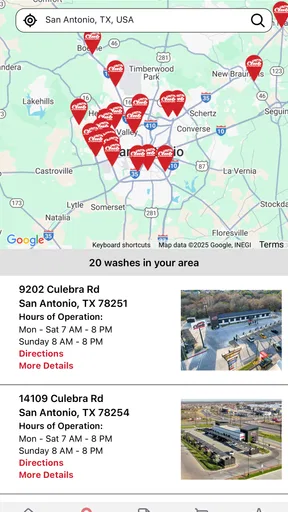
- Quickly locate nearby Club Car Wash sites using GPS.
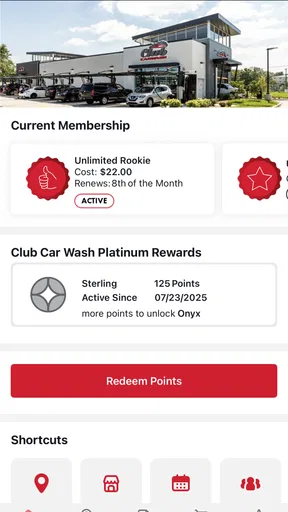
- Membership details and wash plans are easy to access.
- Digital account management reduces the need for physical paperwork.
- Useful for checking available services before visiting a location.
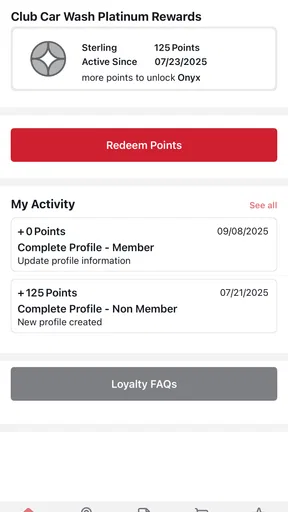
- Mobile access makes it convenient to review wash history and payments.
Limitations of Club Car Wash Mobile App
- Features may be limited if your local Club Car Wash site is unsupported.
- Location permissions are needed for the best experience.
- Some users may find membership options difficult to compare in-app.
- App usefulness depends on having Club Car Wash locations nearby.
- Payment or account changes may occasionally require customer support.
Similar Picks in This Category
View All
Android Auto
Google LLC4.1

maxim — order a taxi & food
PT. SITO4.7

Штрафы ГИБДД: проверка с фото
Pays LLC – Штрафы ГИБДД4.7

Номерограм – проверка авто
Авто Ассист4.8

Дром Авто
Дром4.9

Frequently Asked Questions
What is the Club Car Wash mobile app used for?
The Club Car Wash mobile app is designed to make managing your car wash membership and visits more convenient. Depending on your location and available services, you can use it to review membership details, locate participating washes, check plan information, manage account settings, and access digital offers or promotions. It is especially useful for customers who visit Club Car Wash regularly and want quick access to their account without contacting customer support.
Can I purchase or manage a Club Car Wash membership through the app?
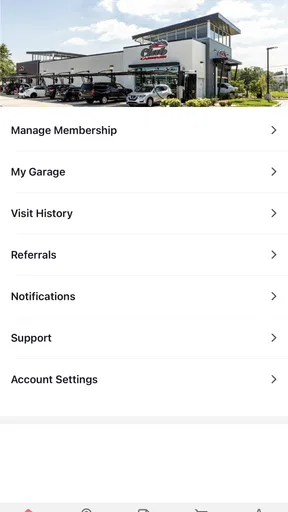
In many cases, the app allows customers to view membership information and manage important account details, while enrollment and plan options may vary by location. You may be able to review your current wash plan, update payment information, check billing details, or explore available membership choices. Before subscribing, carefully review the pricing, cancellation terms, vehicle requirements, and participating locations shown for your area.
Does the Club Car Wash app let me find nearby locations and check their services?
Yes, one of the app’s most practical features is location discovery. Customers can generally use it to find nearby Club Car Wash sites and view relevant information such as addresses, operating hours, and available services. However, offerings may differ between locations, and temporary closures or schedule changes can occur. It is a good idea to confirm the selected location’s details before making a special trip.
Is the Club Car Wash mobile app free to download and use?
The Club Car Wash app is typically free to download from the official Android or iOS app store, although some features are connected to paid car wash memberships or individual purchases. Downloading the application does not necessarily mean that you have an active plan. Membership charges, wash prices, taxes, and other fees depend on the services you choose and the terms displayed during enrollment.
What should I do if the app does not recognize my membership or payment information?
If your membership, vehicle, or payment details do not appear correctly, first confirm that you are signed in with the same email address or phone number used when joining Club Car Wash. Check your internet connection and update the app if a newer version is available. If the issue continues, avoid creating a duplicate membership and contact Club Car Wash customer support with your account and transaction details for assistance.
